Getting Started with your Hexy
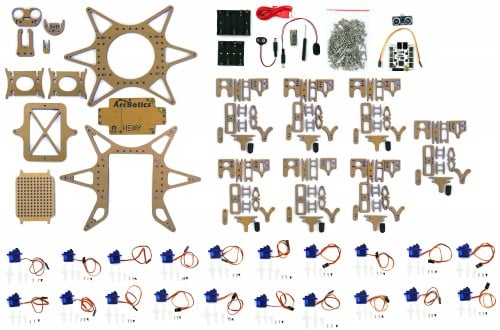
If you have any questions, please ask away on our forums, we check all messages and try to quickly reply to any questions or requests for help. By posting questions on the site, you also help other people who may have the same question/problems. If you have missing/broken pieces, please contact [email protected] immediately.
Getting Started with your Hexy:
1.) Build it!
We’ve got the step-by-step instructions here. You can expect the build to take 3-4 hours:
DO NOT USE 5xAA ALKALINES. The 5xAA battery pack is intended for NIMH batteries only.
More information on Powering Your Hexy
2.) Install Servotor32/Update it
Drivers for the Servotor32 controller that powers Hexy:
Windows 7/XP Driver
OSX and Linux are driver-free installs
Install the Arduino IDE and update the board firmware:
You can upload the servotor firmware as you would any Arduino code. Tutorials for how to upload arduino code are available for Windows, Mac OS X and Linux. The board is programmable as an Arduino Leonardo.
Servotor32 v2.0 Firmware
Servotor32 v1.7 Firmware
Servotor32 v1.5 Firmware
Servotor32 v1.4 Firmware
Servotor32 v1.3 Firmware
3.) Install Python
We use Python 2.7.3 and PySerial 2.6.
Mac Instructions
Since Python is included in Mac OS X, you’ll simply need to install the PySerial library.
- Install PySerial:
$ sudo easy_install pyserial
Windows Instructions
- Download and install Python
- If on a 32bit Windows PC, get the x86 version of PySerial
- If on a 64bit Windows PC, get the x64 version of PySerial
4.) Run PoMoCo
Our Position and Motion Controller – ‘PoMoCo’
Download PoMoCo and run PoMoCo.py
PoMoCo may be launched by changing into the PoMoCo directory and running the following:
Mac Example
$ cd PoMoCo
$ python PoMoCo.py
Windows Example
With python installed, double click on PoMoCo.py in the PoMoCo folder.
More information on using PoMoCo is available here
5.) Robo-Dance away!
Remember: Hexy likes NiMH batteries more than alkalines
More documentation on the wiki
Support available on the forums, or by emailing:
[email protected]
For replacements and troubleshooting of any missing/defective servos, email: [email protected]